

Uni-Directional USB C Female to HDMI Male Adapter, (USB-A to HDMI not Supported), 4K60 Thunderbolt 3/4 to HDMI2.0 for MacBook Pro/Air, Surface, Galaxy S8 to S23, iPhone 15 Series - 1 Pack
US$5.20
Price when purchased online
Free shipping
Free 30-day returns
Sold and shipped by www.hqtherapy.com
We aim to show you accurate product information. Manufacturers, suppliers and others provide what you see here.
US$5.20
Price when purchased online
Free shipping
Free 30-day returns
Sold and shipped by www.hqtherapy.com
Free 30-day returns Details
Product details
| Management number | 247732511 | Release Date | 2026/08/16 | List Price | US$5.20 | Model Number | 247732511 | ||
|---|---|---|---|---|---|---|---|---|---|
| Category | |||||||||
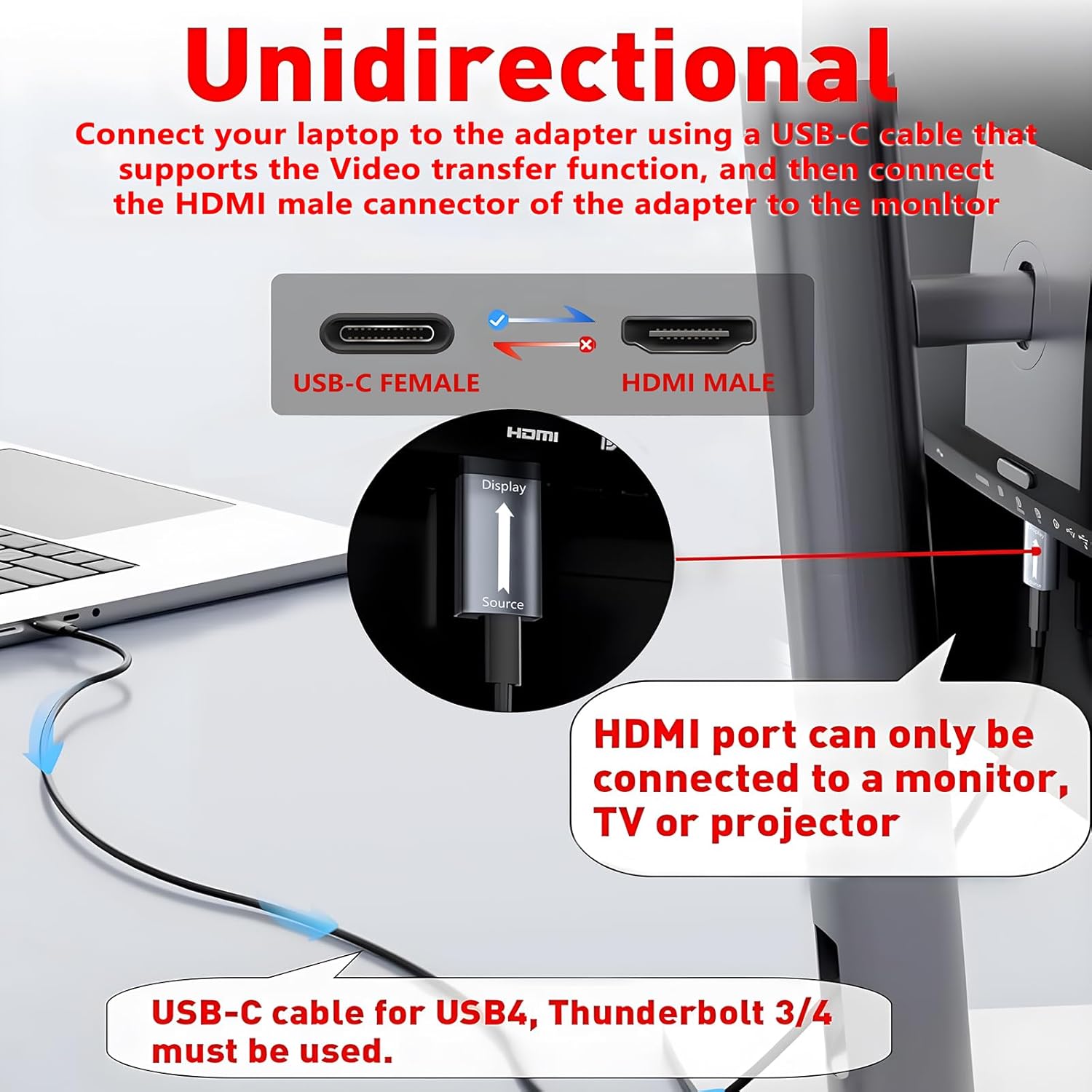
- 【Uni-Directional USB C to HDMI(Not USB to HDMI) Transmission】Please pay attention to the direction of signal transmission when using this product. The HDMI port of the converter is connected to the receiving device (display device), please do not connect the HDMI port to your laptop, the USB C port of the converter is used to plug in a Type-C cable to connect your laptop and cell phone, the cable version needs to use USB 3.2Gen2x2/4.0/Thunderbolt 3/4 and support video transmission function.
- 【Crystal Clear 4K High Resolution】The USB C to HDMI Adapter supports resolutions up to 4K and is backward compatible with 1080P@144 Hz/60 Hz,supporting RGB444/YUV444/YUV422/420. Expandable/mirrorable to a larger screen for a crystal-clear visual experience.
- 【Wide Compatibility】The Thunderbolt 3/4 to HDMI adapter compatible with all USB-C devices that support "DP Alt Mode" and Thunderbolt 3/4 ports; Compatible with MacBook Pro, MacBook Air,iMac/iMac Pro,iPad Air/iPad Pro,supports M1/M2 devices, Surface Book, Surface Pro, Chromebook, Dell and More
- 【Plug and Play】This USB-C Female to HDMI Male adapter is plug and play, no driver installation required.How to use: 1. Connect the usb-c female connector to MacBook, iPad, iPhone 15, etc. via usb-c cable range 2. Plug the HDMI male connector into the monitor(Note:USB-C cable Use USB 3.1 or above/Thunderbolt 3/4 cables for video/audio transmission. Don't use with hubs/KVMs/dockings/switches)
- 【Important】1. Please note if your USB C source device port supports video transmission or DP Alt mode (you can usually see the DP logo next to the port) 2. It is not bi-directional, and only supports uni-directional USB C source signals to HDMI displays 3. Please use another supported video transfer cable to connect the USB C female connector of the adapter and plug the HDMI male connector into the display device (If you have any questions, please feel free to contact us)


Bestseller ranking
Video Converters



Customers who viewed this product also viewed
Sobriety Coins & Chips


Correction of product information
If you notice any omissions or errors in the product information on this page, please use the correction request form below.
Correction Request Form